
 Session timeout






Welcome to the QUT ERMR for reviewers system
This is the QUT ERMR Splash page where new announcements will be periodically updated
- For detailed guidance on Biosafety and Research Ethics search the QUT Digital Workplace - Research ethics and integrity
- Visit the ERMR FAQs page to review solutions for frequently asked questions
- Visit the ERMR HELP page for guidance on accessing, navigating and completing applications in ERM

Alerts and Notifications
Select a heading below to expand/contract each section
Browsers
Some users of the QUT ERM system have found issues while using devices such as iPhones and Mac Computers with the Safari Browser.
In some cases action buttons have not appeared and pop up windows have not appeared.
The ERM Administrator recommends you use Edge or Chrome on a Windows device for the best experience with ERM.
Please use Edge or Chrome for a better experience in ERM 
Housekeeping
Each different browser you use on different device will behave differently and cache different information on each ERM page.
If you are having difficulty viewing information any of or all of these steps can help refresh your page:
- refresh the page
- log out and back in again
- clear all the cookies and cache in the browser settings
An amended 2025 version of the National Statement on Ethical Conduct in Human Research (NS)
has been released by NHMRC, with implementation of the changes to take effect at QUT, from 1st September 2025.
These changes will need to be considered by all researchers and reviewers involved in human research ethics applications.
A downloadable version of the 2025 NS and a link to FAQs that outline the major NS changes are available:
Throughout August OREI will be updating all relevant human research ethics documentation,
training, and advice on the Digital Workplace for staff and HiQ for research students.
View changes since previous approval only shows after an application has had its first Approval and has been resubmitted for an Amendment or Variation.
Search and “Open” the application for review
- Select “Review Application”
- Select the “Changes” Modal
- You can then toggle between the “last” and the “previously approved” submission and you’ll see the list of changes update.
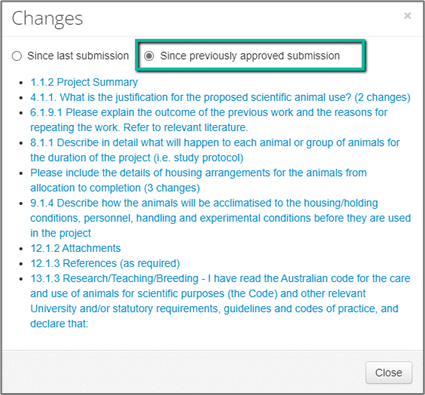
5. Select a link to navigate into the form. You’ll then see the new “View Changes” button ant the top of the page.

Alternatively, if you navigate into the form without selecting the “Changes” modal, you will have the option to select either of the “View Changes” buttons.

The ERMR User Interface (UI) has been updated
Including improvements to accessibility, contrast and navigation. This is the first stage of a raft of UI improvements coming from the vendor of ERM.
NEW LOOK ‘WORK AREA’
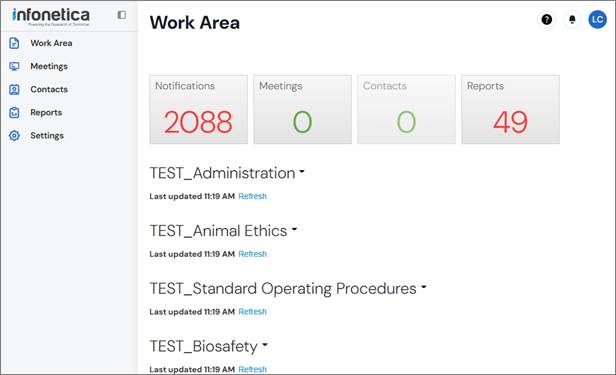
Here are the key changes to note for Reviewers using ERMR for reviewing applications, these changes are continued across all levels of the ERM platform for a consistent user experience.
What is new:
- New navigation pane on the left-hand side
- New text fonts and changes to contrast level to make reading easier
- New look actions buttons are displayed in the upper middle area of each page in line with the page content
- When working in your application form there is a new 'Overview' bar on the right-hand side that displays key information about your application
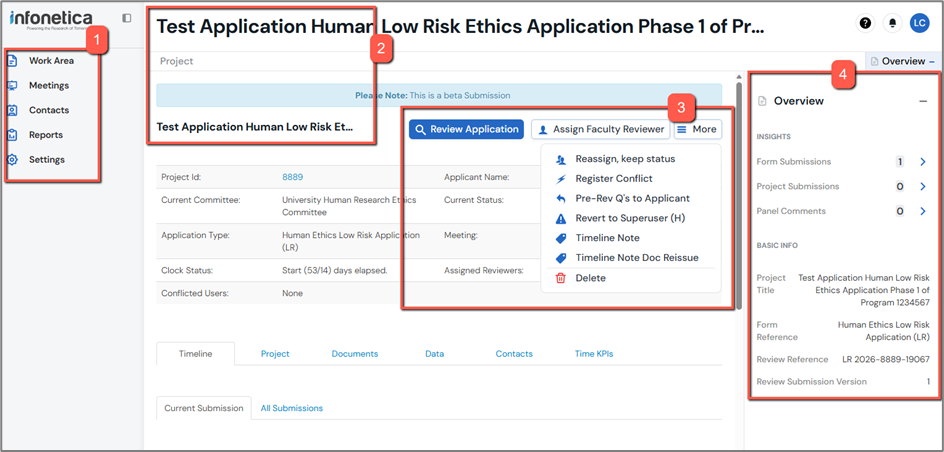
What has moved:
- 'Contact Information, Help, FAQ, Templates, About' pages now in the top right-hand corner of the page (QUESTION MARK ICON)
- 'Notifications' have moved to the top right-hand corner of the page (BELL ICON)
- The 'Previous' and 'Next' page buttons now
- appear at the bottom of the page when navigating in an applications page section; and
- will float in place as you scroll; and
- will always be visible.
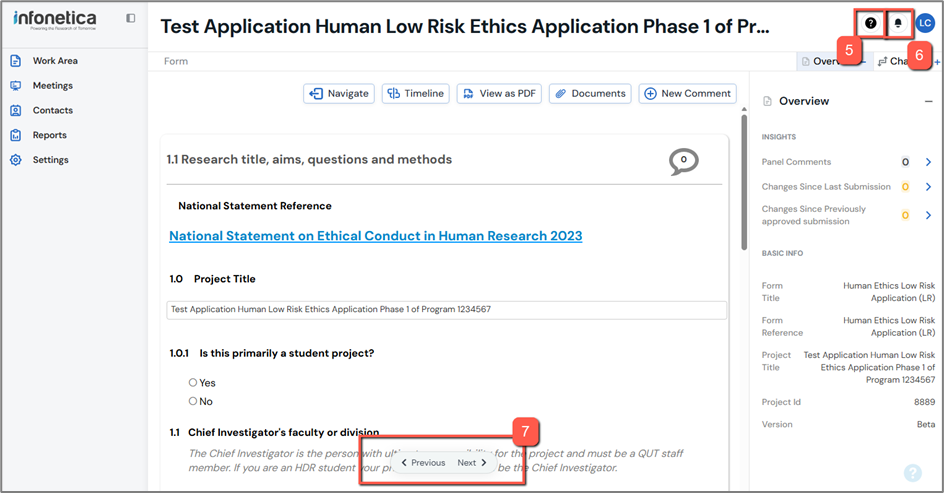
Further changes and improvements to the UI will be announced via this page.
